
How can the patient log into their Almendra account?
Patients log in at pacientes.almendra.io with their email and password. If they have no account yet, send the access email at signup or from their profile.
Updated August 8, 2024
To log into their Almendra account, the patient needs to have already created their account.**A) If the patient already has an account:**They should go to [https://pacientes.almendra.io/login\](https://pacientes.almendra.io/login) and enter their email and password.
B) If the patient does not have an account yet:
To create their account, they should have received an email. This email may have been sent at two different times:
1. When you registered them as a patient:
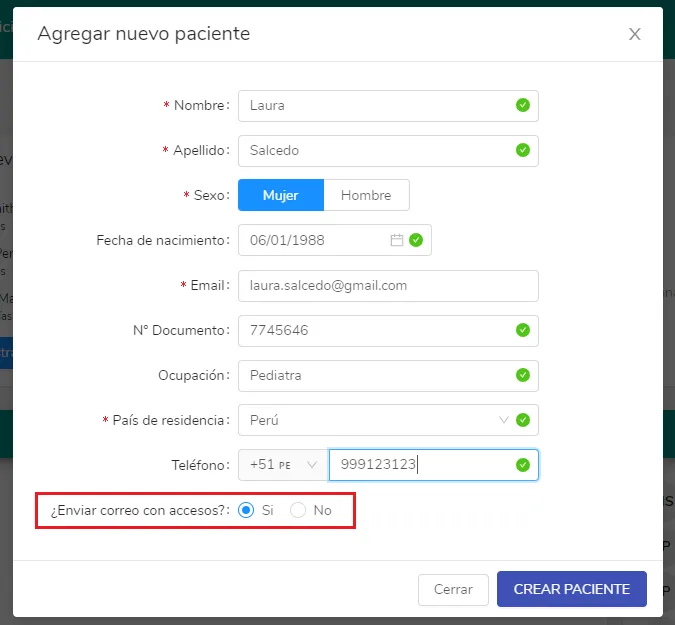
Make sure the “Send access email?” field is marked with “Yes.” If you don’t see this field, it means your setting is disabled. To activate it, go to General Settings:
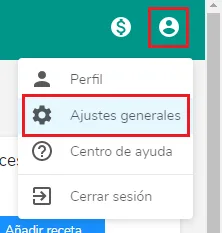
There, click on the “Mailing” section, and you will see the following:
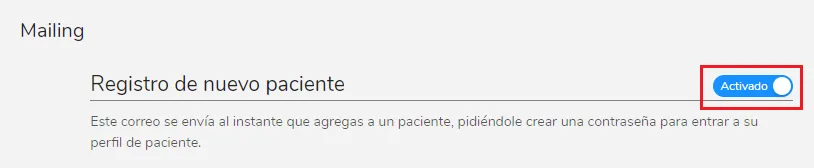
Make sure the button is set to “Activated,” as shown in the image above. Now, whenever you register a new patient, you will see the “Send access email?” field. When you register the patient, they will receive an email where they can create their Almendra account.**2. When you change their email from their profile:**If you didn’t have the patient’s email when you registered them, that’s not a problem; you can still register them. When you go to their profile, you’ll see that the “Email” field is empty, as expected.Enter the patient’s email, and when you click outside the field to save the email, the following window will open:
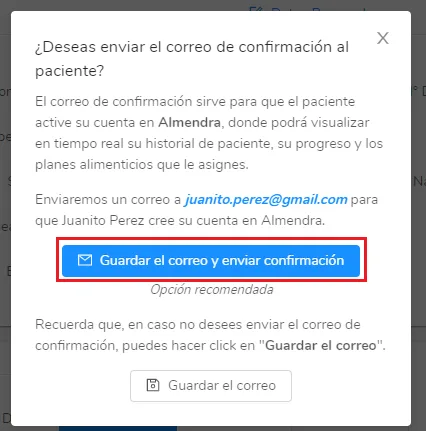
Click “Save email and send confirmation,” and the email will be sent through which the patient will need to create their password.
Can’t find what you’re looking for?
Our team replies within 1 business day, Monday to Friday 9:30 AM – 6:00 PM (GMT-5).