
Patient referrals
With patient referrals in Almendra, each patient gets a code and link to invite others, and you set the discount for the new patient and the referrer.
Updated August 20, 2026
Your happiest patients already recommend you. Now Almendra makes it automatic: each patient gets a code and a link to invite someone, and you decide the discount for the person who joins and for the person who invites them.
This is not Almendra’s referral program (the one for recommending the software to other professionals). This one is between your patients.
How to turn it on
- Go to Settings → Web Tools.
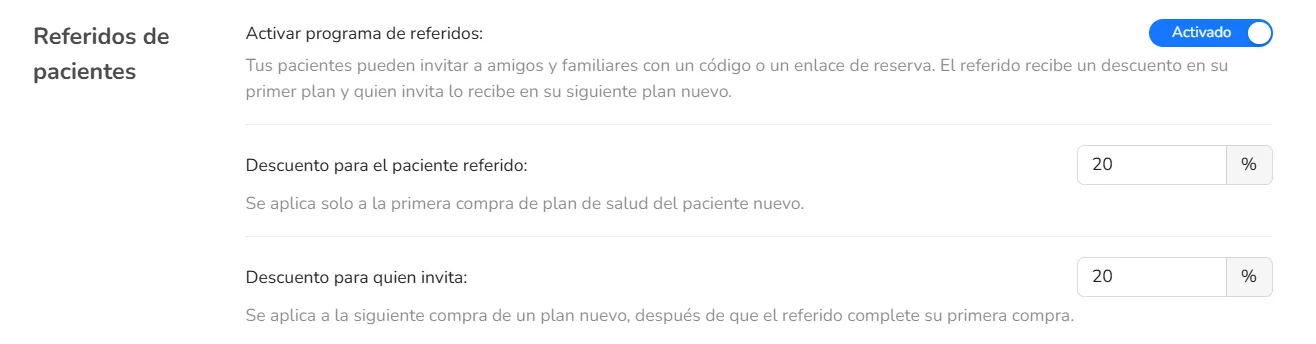
- Under Patient referrals, turn the program on.
- Choose two percentages (from 0% to 100%), independent of each other:
- Discount for the referred patient: on their first plan purchase.
- Discount for the referring patient: on their next new plan, once the referred patient has made that first purchase.
With 0%, referrals are still recorded. There’s just no discount.
How it’s shared
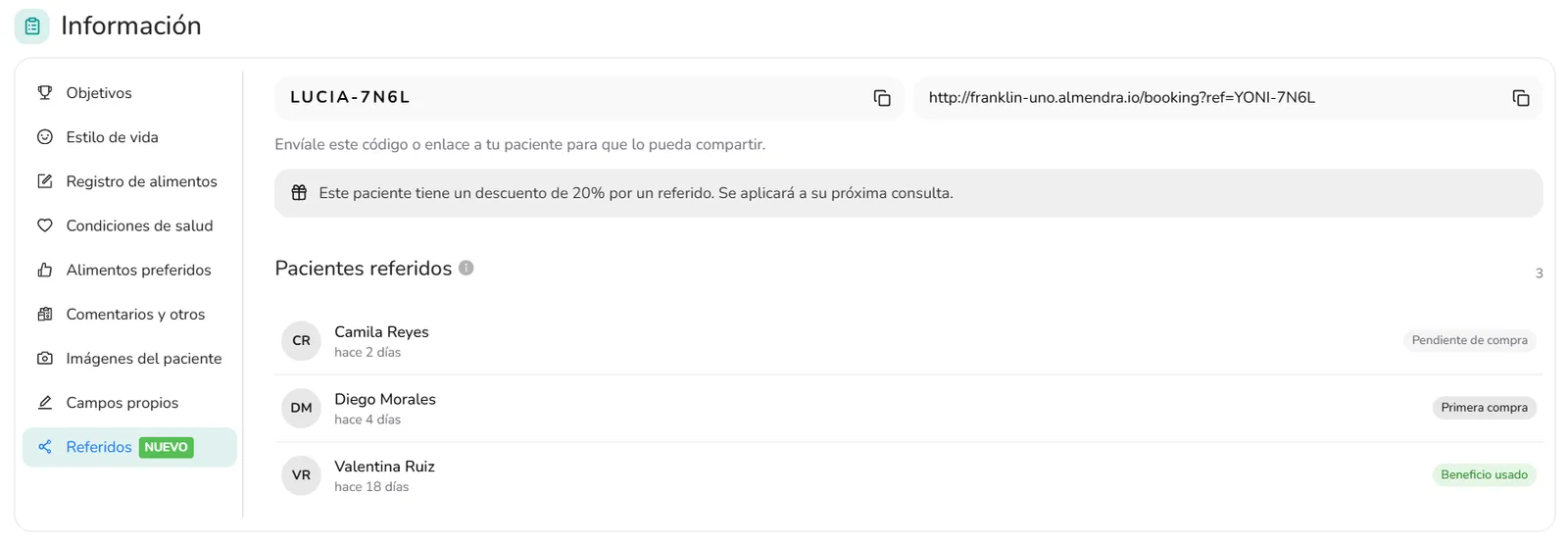
In the patient’s profile, on the Referrals tab, you’ll see the code and the booking link. Copy them and send them to your patient so they can share them.
Anyone who books with that link or code is linked to the person who invited them.
You can also mark it yourself when creating an appointment or assigning a plan, if they told you during the appointment.
How the discounts work
- The referred patient gets it when they buy their first appointment.
- The referring patient gets it on their next appointment, not on the balance of a package they already have.
- A booking with no charge or with a price of 0 doesn’t complete the referral or use up the reward.
- The percentage is locked in at the time of purchase. If you later change the discounts in settings, anything already closed isn’t rewritten.
What you see in the profile
Under Referred patients, you’ll see everyone who used the code, along with their status:
- Waiting for first purchase: they booked or signed up, but haven’t bought their first plan yet.
- First purchase: they already bought it. The referring patient has the discount ready for their next appointment.
- Reward used: the referring patient has already used that discount on a new plan.
If there’s a pending discount, you’ll see it in the profile and when assigning the next plan.
In the patient list, the Referrals column shows how many people each patient has brought in.
Getting the most out of it
Turn it on, set a discount that makes sense for you, and send the code to the patients who already recommend you. They do the inviting. Almendra applies the discount and keeps the history in the profile.
That’s how easy it is to grow your practice with Almendra.
Can’t find what you’re looking for?
Our team replies within 1 business day, Monday to Friday 9:30 AM – 6:00 PM (GMT-5).