
How do I add a recipe to a meal plan?
Add a recipe to a meal plan in Almendra just like a food: search for it, pick grams, ounces, or servings, and your patient will see how to prepare it.
Updated August 12, 2024
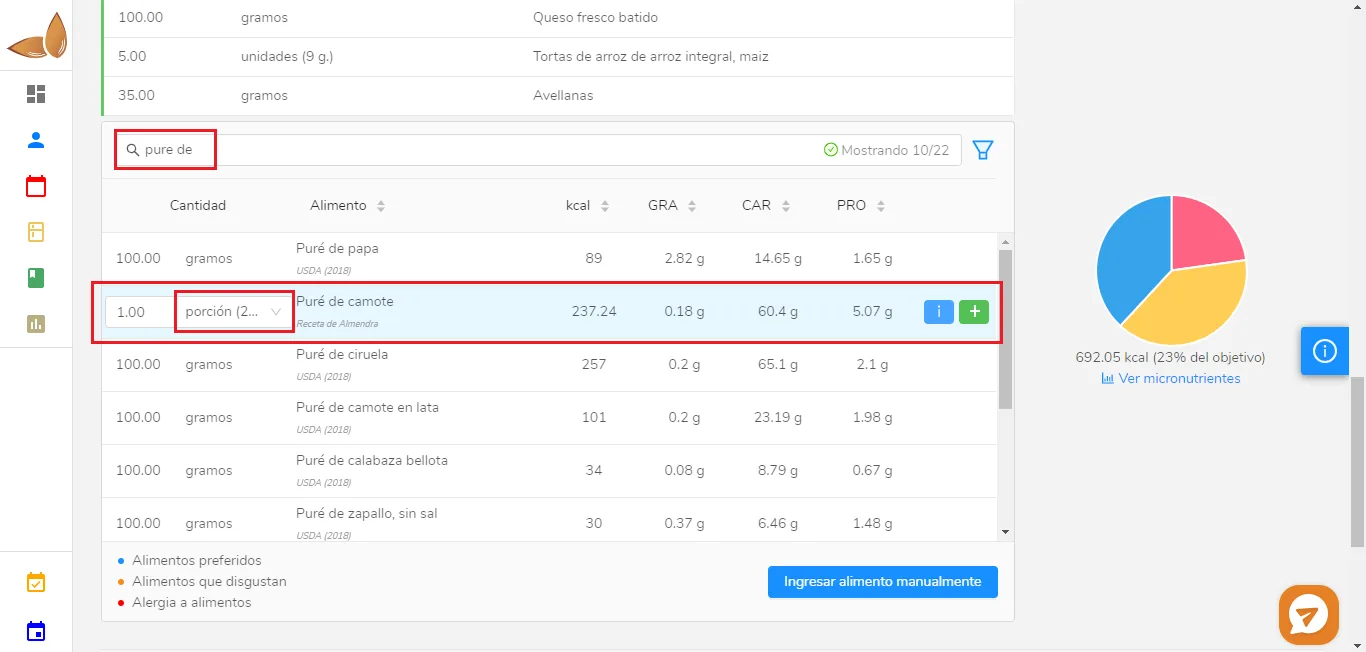
To add a recipe to a meal plan, you need to do exactly the same as if you were adding any food item.For example, if you want to add the recipe “Sweet Potato Puree,” and you are not currently in the meal plan section, please navigate there in the food selection section (see image below).
-
Type the name of the recipe in the search bar (in this case, we want to add the recipe “Sweet Potato Puree”).2. Find the recipe in the search results.
-
Choose whether to add it in grams, ounces, or servings (in the image, 1 serving is selected).
-
Click the green + to add it.
The patient will see the ingredients and instructions for that recipe in their meal plan, whether they view it through the PDF or their Almendra patient account.
Can’t find what you’re looking for?
Our team replies within 1 business day, Monday to Friday 9:30 AM – 6:00 PM (GMT-5).