
I can't find a food. How do I add it to the meal plan?
If a food doesn't show up, enable every database in General Settings or use Create food manually. Only you and your patients will see it.
Updated January 6, 2022
Before adding your own food, make sure it isn’t in any of Almendra’s databases. Go to General Settings, check all the databases, and then search again in the food search. If you still can’t find the food you want, follow these steps:
1. Enter the name of the food you want to add in the search:
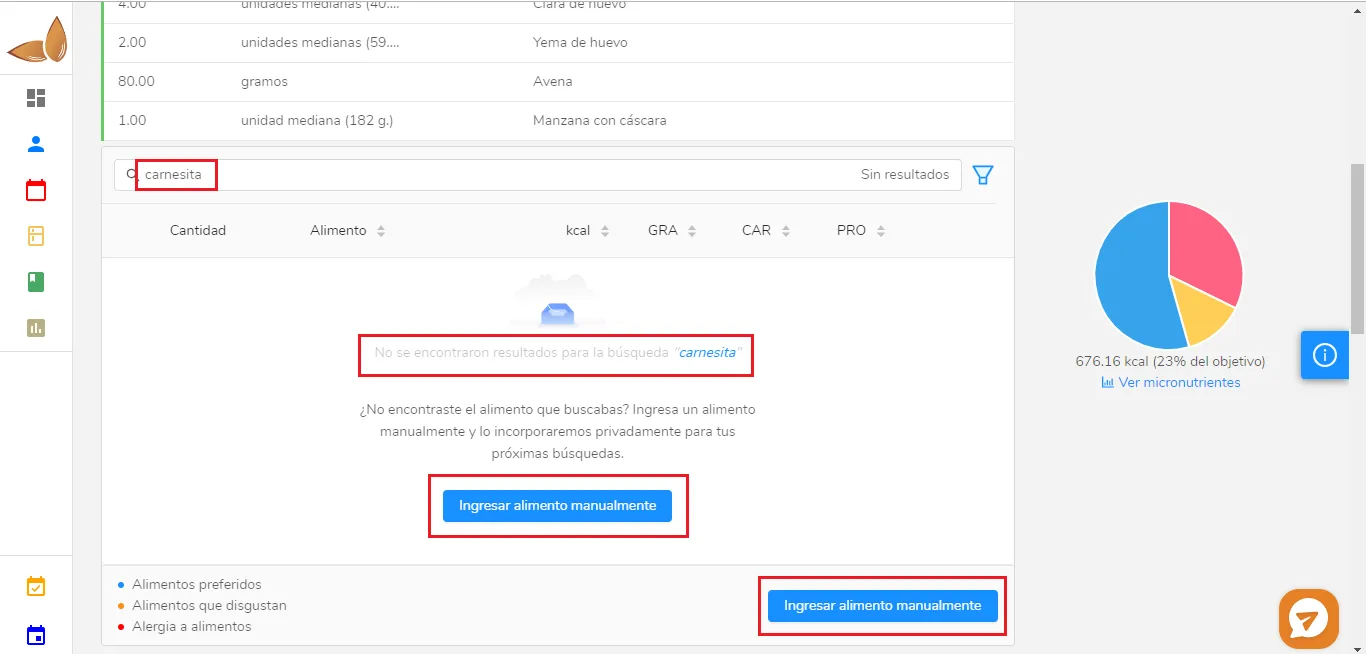
You’ll see the message “No results found for the search “carnesita”“.
2. Click “Create food manually” (either of the two buttons).
The following window will open (it opens empty; some fields have already been filled in here):
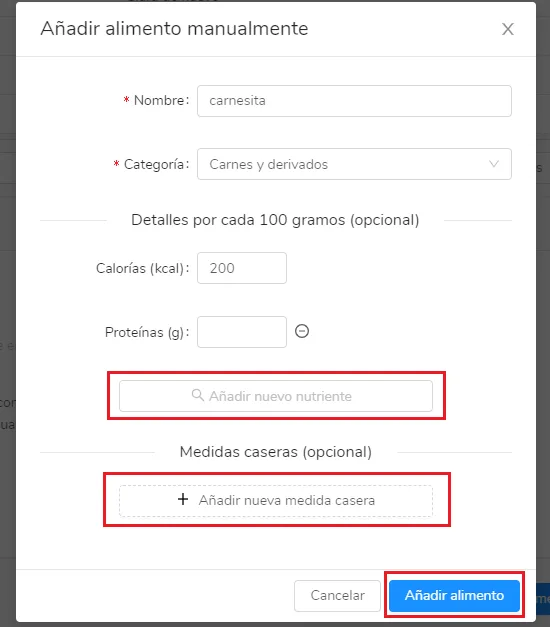
Fill in the fields you want and then click “Add food”. You can add household measures and any nutrient you want. Remember that this food will only appear in your own searches; no other Almendra user will be able to see it in their search. The only others who will be able to see this food are your patients, if you add it to their meal plans.
Can’t find what you’re looking for?
Our team replies within 1 business day, Monday to Friday 9:30 AM – 6:00 PM (GMT-5).